
Among the many OGG projects I’ve handled, one scenario remains vivid in my memory. A costly cross-platform data center migration project came to a grinding halt during the final data synchronization phase. The source-side Extract process (on an IBM Power server) was running happily, and Trail Files were being generated continuously. However, the target-side Replicat (on an x86 Linux cluster) was failing across the board, with logs filled with various unparsable errors. The team battled through two sleepless nights, making no headway.
The ultimate culprit was not the network, not the configuration, nor the data itself. It was a tiny yet fatal detail inside what everyone took for granted as a ‘black box’—the OGG Trail File.
For most OGG users, the Trail File is just a pipeline connecting Extract and Replicat. We know it exists, but few have ever truly opened it up to understand it. This blind spot in our knowledge might be harmless in regular scenarios, but in complex migration or upgrade projects, it can become the detonator for major issues. Today, I’ll guide you as we take a ‘scalpel’ and, using real logdump output, thoroughly dissect the lifeline of OGG—the Trail File. My goal is to transform your fear of this ‘black box’ into mastery over it.
1. Deep Dive into the ‘Black Box’: Dissecting the Trail File with LOGDUMP
First, let’s overturn a common misconception: a Trail File is not a chaotic jumble of binary data. It possesses a sophisticated, well-defined internal structure. Think of it as a bound book, not a pile of loose manuscript pages.
OGG comes with a powerful diagnostic tool, LOGDUMP, which is our ‘microscope’ for exploring the internals of a Trail File. Now, let’s use the logdump output from our earlier example to interpret it record by record.
Logical Structure of a Trail File
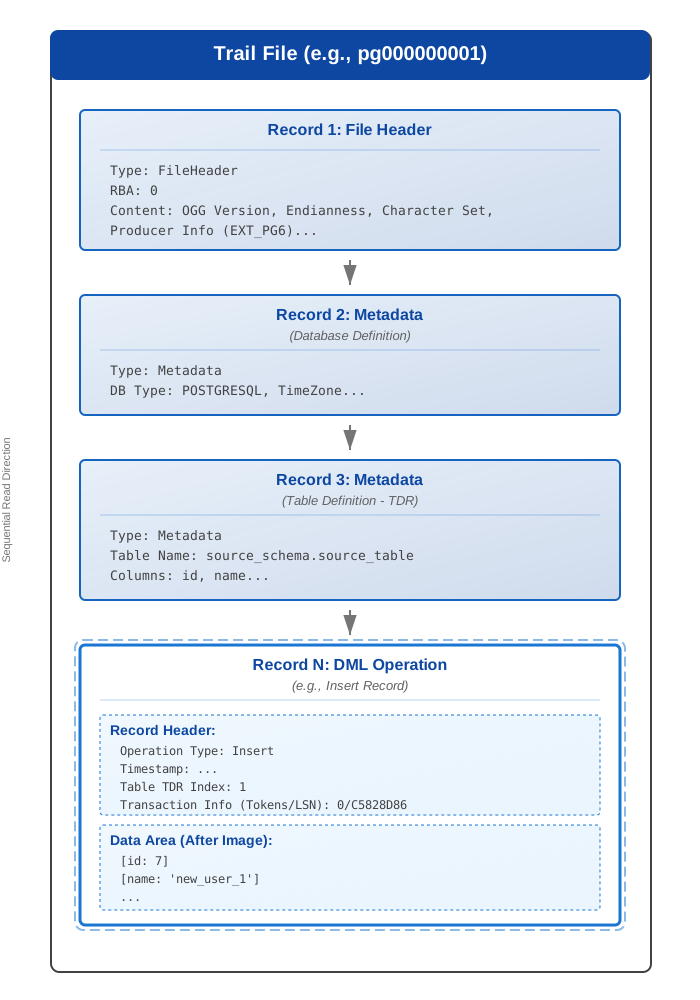
First Stop: File Header (FileHeader)
2025/07/05 13:41:24.857.026 FileHeader           Len  1370 RBA 0
Name: *FileHeader*
...
uri:ole810::acfsogg:oggp:EXT_PG6
...
This is the opening of every Trail File. logdump tells us that at the beginning of the file (RBA 0, Relative Byte Address), there is a FileHeader record with a length of 1370 bytes. It’s like the copyright page of a book, recording the file’s ‘provenance’, including but not limited to:
- Generator Information:
uri:ole810::acfsogg:oggp:EXT_PG6clearly indicates that this file was generated by the Extract processEXT_PGin the OGG instance located at/acfsogg/oggpon the hostole810. - OGG Version: Although not directly displayed, the version information is encoded in the binary data.
- Endianness: Also encoded within, this determines how subsequent multi-byte data is interpreted.
Second Stop: Metadata Record
Before any data operations, OGG writes several metadata records to provide ‘context’ for subsequent data parsing.
Database-Level Metadata:
2025/07/05 14:53:15.399.670 Metadata             Len 90 RBA 1439
Database type: POSTGRESQL
Character set ID: UTF-8
TimeZone: GMT+08:00
This record tells us the data source is a POSTGRESQL database, the character set is UTF-8, and the time zone is GMT+08:00. This information is crucial for correctly parsing data across different platforms and character sets.
Table Definition Record (TDR):
2025/07/05 14:53:15.399.671 Metadata             Len 261 RBA 1580
Table Name: source_schema.source_table
...
Columns: 4
id           134     23        0  0  0 0 0      8      8 ...
name          64    300       11  0  0 1 0    300    300 ...
...
This is an extremely important part of the Trail File. OGG writes the structure definition of each table (table name, column count, column names, data types, lengths, etc.) into the Trail File. When the Replicat process applies data, it first looks up the corresponding TDR and uses this ‘map’ to parse the subsequent data records. This is why OGG can map data using COLMAP even if the source and target table structures are not identical.
Third Stop: DML Record
This is the core content of the Trail File, recording the actual data changes.
2025/07/05 14:53:15.309.792 Insert               Len   114 RBA 1918
Name: source_schema.source_table  (TDR Index: 1)
After  Image:                                             Partition x0c   G  b
...
GGS tokens:
 7401 0000 ... 4c00 1100 ... 3030 ... 2f30 4335 3832 3844 3836
Let’s analyze this record in detail:
- Operation Type:
Insert, this is an insert operation. - Record Length and Position:
Len 114 RBA 1918, length is 114 bytes, starting at position 1918. - Associated Table:
Name: source_schema.source_table, and it points to the previously defined TDR via(TDR Index: 1). - Image:
After Image, because it’s anINSERToperation, it only contains the data image after the change. - GGS Tokens: This section contains rich transaction information, such as the PostgreSQL LSN (Log Sequence Number)
0/C5828D86, which is key to implementing recovery checkpoints and ensuring data consistency. - Column Data:
logdumpconveniently parses the value of each column for us, such asnew_user_1.
With logdump, we have turned the ‘black box’ of the Trail File into a transparent glass house.
2. Version Compatibility: The Correct Way to Use the ‘Time Machine’
‘Can a Trail File generated by a 19c Extract be read by a 12c Replicat?’ This is a question I’m frequently asked during version upgrade consultations.
The answer is: Probably, but you need to tell OGG to do so.
As OGG evolves, the Trail File format also evolves to support new data types, compression algorithms, or features. By default, a newer version of OGG will generate a new format Trail File, which an older Replicat may not be able to recognize.
To solve this, OGG provides a ‘time machine’ parameter: FORMAT RELEASE. You can specify it in the Extract or Data Pump parameter file to force the process to generate a backward-compatible, older-format Trail File.
-- Add to the Extract or Pump parameter file
-- Force generation of a Trail File format compatible with OGG 12.3
EXTRACT epump
USERIDALIAS ogg_admin_alias DOMAIN OracleGoldenGate
RMTHOST target_server, MGRPORT 7809
-- The FORMAT RELEASE here is key
RMTTRAIL /u01/app/ogg/dirdat/rt, FORMAT RELEASE 12.3
TABLE hr.*;
My practical advice is: In any mixed-version OGG deployment, in the direction of the data flow (from Extract to Replicat), the FORMAT RELEASE version number should be set to the lowest version of any OGG component in the chain. This ensures a smooth data flow and prevents process failures due to format incompatibility.
3. The ‘Hidden Killer’ of Cross-Platform Migration: Endianness
Now, let’s reveal the mystery behind the failure of the migration project mentioned at the beginning of the article—Endianness.
This fundamental concept in computer architecture is a blind spot for many engineers. Simply put, it determines how a multi-byte piece of data (like a 4-byte integer) is stored in memory:
- Big-Endian: The most significant byte is stored at the lowest memory address. This aligns with human reading habits. Examples include IBM Power and SPARC servers.
- Little-Endian: The least significant byte is stored at the lowest memory address. Examples include Intel x86 and AMD64 architecture servers (the PCs and most Linux/Windows servers we use daily).
When a binary file generated on a big-endian machine (like an OGG Trail File) is directly copied and read on a little-endian machine, all multi-byte data will be misinterpreted, resulting in gibberish that looks like an ‘alien script’.
How to avoid this massive pitfall?
NEVER manually transfer Trail Files between platforms with different byte orders using file copy methods like scp or ftp!
The correct approach is to always use OGG’s Data Pump process to handle this transfer. The Pump is designed with this issue in mind. When the Pump connects to the remote Manager process, they ‘handshake’ and exchange platform information. If the Pump detects that the source and target have different byte orders, it will automatically and transparently perform the byte order conversion during the network transmission.
This process is seamless to the user, but it’s the critical mechanism that ensures the success of cross-platform data synchronization. The project at the beginning of the article failed because they took a shortcut and directly copied the Trail File with scp, falling right into this trap.
4. From Chaos to Order: Trail File Operations Best Practices
Understanding the internal mechanisms is not enough; we also need a set of effective management practices to ensure the stable operation of the OGG system.
- Automated Cleanup to Avoid Disk ‘Explosions’
Trail Files are generated continuously. Without management, they will eventually fill up the disk. OGG provides the
PURGEOLDEXTRACTScommand for automated cleanup. I strongly recommend configuring it in the Manager parameter file to make it a global, automatic guardian task.
-- Add to mgr.prm
-- Automatically check and purge daily, keeping the last 72 hours of Trail Files
-- USECHECKPOINTS ensures only logs that have been processed by Replicat are purged
PURGEOLDEXTRACTS ./dirdat/*, USECHECKPOINTS, MINKEEPHOURS 72
-
Rational Storage Planning (NFS) In a RAC environment, placing Trail Files on high-performance NFS shared storage or an ACFS file system carved from an ASM disk group is a very common best practice. The advantage is that when a RAC node fails over, the Extract process can seamlessly take over on a new node and continue writing to the Trail File from where it left off, simplifying failover complexity. However, be aware that NFS performance and mount parameters (like
rsize,wsize) are critical to OGG’s performance. -
Controlling File Size and Rotation Using the
MEGABYTESoption in the Extract parameter file, you can control the size of individual Trail Files. Once the specified size is reached, it will automatically switch to the next file. This helps with subsequent file management and troubleshooting.
Summary
Today, we used logdump as our scalpel to thoroughly dissect the ‘black box’ that is the OGG Trail File. I hope you are no longer a stranger to it and no longer fear it. Let’s quickly review the key takeaways:
- Structured: The Trail File has a clear ‘File Header -> Metadata -> Data Records’ structure.
LOGDUMPis the essential tool for exploring its internals and turning binary data into readable information. - Version-Aware: Different OGG versions may use different Trail File formats. In a mixed environment, always use the
FORMAT RELEASEparameter to ensure compatibility. - Platform-Sensitive: Endianness is the ‘hidden killer’ of cross-platform migrations. You must use a Data Pump to transfer data between platforms with different byte orders.
- Management is Key: Automated cleanup (
PURGEOLDEXTRACTS) and proper storage planning are the cornerstones of long-term system stability.
The OGG Trail File is the lifeline of the entire data synchronization process. Understanding it, respecting it, and managing it scientifically is a key step in your journey from being an OGG ‘user’ to becoming an ‘expert’.