
I once encountered a classic performance tuning case: a large retail enterprise’s core transaction system was synchronized to a data analysis platform. The Extract side was under no pressure, but the Replicat side’s latency snowballed from minutes to hours. The DBA team responsible for monitoring was anxious but helpless. They checked the target database’s hardware, indexes, and network—everything was normal, but the Replicat just wouldn’t “run fast.”
This is a typical Replicat performance bottleneck, and its root cause is often not that the database is “slow,” but that the “dialogue” between OGG and the database is too inefficient.
When you face this sense of powerlessness, you likely need to bring out the “nuclear weapon” of OGG Replicat performance tuning—the BATCHSQL parameter. However, many engineers have heard of it but dare not use it lightly because they don’t understand its underlying logic and potential “side effects.”
Today, I will take you on a journey to completely demystify BATCHSQL. We will delve into its working principles, learn how to safely harness it, and clarify in which scenarios it can unleash its “10x speed-up” power. After reading this article, you will be able to confidently turn this “double-edged sword” into your go-to weapon for solving Replicat performance issues.
1. Why is Your Replicat “Slow”? The Root of the Problem
Before diving into BATCHSQL, we must first understand why Replicat’s default working mode creates bottlenecks.
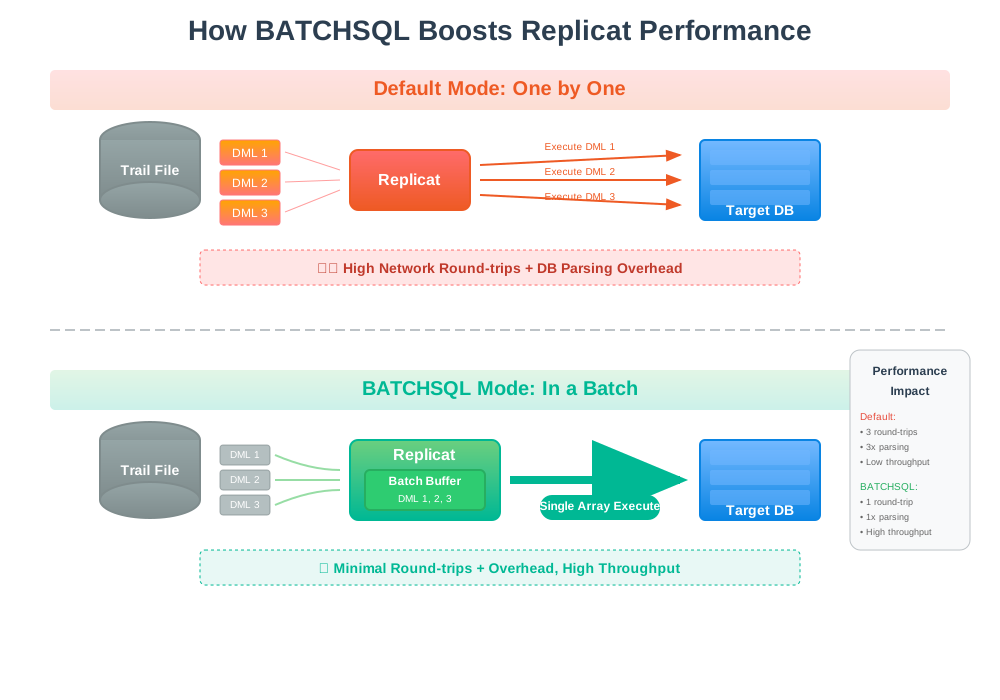
By default, Replicat acts like a diligent but slightly rigid employee. It reads a DML operation (like an UPDATE) from the Trail File and sends a SQL request to the target database; then it reads the next one and sends another request.
This is like 100 people queuing at a window, each buying one ticket individually. The entire process involves:
- 100 network round-trips: Each request needs to travel over the network to the database and get a result back.
- 100 SQL parses: The database needs to repeatedly parse the execution plan 100 times for these 100 nearly identical
UPDATEstatements. - 100 individual commits: If these operations belong to different transactions.
When the source TPS (Transactions Per Second) soars, this “one-by-one execution” model causes an explosive growth in the number of interactions between Replicat and the database, which is the real performance killer.
Workflow Comparison Diagram
2. How Does BATCHSQL Create “Miracles”? The Magic of Array Execution
The emergence of BATCHSQL completely changes this inefficient “dialogue” method.
With BATCHSQL enabled, Replicat becomes “smarter.” It no longer sends SQL one by one. Instead, it acts like a tour guide, gathering a group of travelers (DML operations) with the same destination and operation type, then goes to the window once and says, “Hello, I’d like 100 tickets to attraction A,” and hands over a list with the information of 100 people.
This is the underlying array execution (or Array Binding/Bulk Operations) technology in databases. BATCHSQL “packages” multiple independent DML operations in memory and then submits the entire array to the database for execution through a single API call.
The benefits are revolutionary:
- Drastically reduced network round-trips: What used to be 100 network interactions now becomes 1.
- Significantly fewer SQL parses: The database only needs to parse this SQL statement with array binding once and then execute the data insertion/update 100 times in a loop.
- Optimized database I/O: The database can utilize I/O resources more efficiently when processing bulk operations.
In this way, BATCHSQL greatly reduces the CPU consumption of the Replicat process and the target database, thereby improving performance by an order of magnitude. Achieving a “10x speed-up” or even higher is no exaggeration.
3. Mastering BATCHSQL: Key Parameters and Tuning Strategies
While BATCHSQL is powerful, it is not an isolated switch. Its effectiveness is influenced by OGG’s internal buffering mechanisms and other performance parameters.
Enabling BATCHSQL
First, enabling BATCHSQL is very simple. You just need to add this parameter to the Replicat parameter file.
-- Replicat parameter file (rep.prm)
REPLICAT rep_dw
USERIDALIAS ogg_tgt_alias DOMAIN OracleGoldenGate
-- Enable BATCHSQL mode directly
BATCHSQL
MAP source.orders, TARGET dw.orders;
It’s important to note that OGG does not provide a parameter named BATCHSIZE <bytes> to directly control the memory size of the batch. The size of the batch is determined by OGG’s internal buffering mechanism, transaction boundaries, and operation types; it manages memory automatically.
Synergistic Tuning: Amplifying the Effect with GROUPTRANSOPS
To maximize performance, we usually combine BATCHSQL with another powerful performance parameter, GROUPTRANSOPS.
GROUPTRANSOPS <number>(Group Transaction Operations)- Function: This parameter instructs Replicat to merge multiple source transactions into a single, larger target transaction. For example, setting
GROUPTRANSOPS 100means Replicat will accumulate 100 source transactions and then commit them on the target with a singleCOMMIT. - Relationship with BATCHSQL:
BATCHSQLoptimizes the DML execution efficiency within a transaction (reducing SQL interactions).GROUPTRANSOPSoptimizes the commit efficiency between transactions (reducingCOMMITcounts).
- Synergistic Effect: When you use them together, you achieve a dual optimization. Replicat first aggregates multiple transactions, and then within this larger “super transaction,” it executes all DML operations efficiently using
BATCHSQL. This is exceptionally effective for scenarios with a high volume of small transactions.
- Function: This parameter instructs Replicat to merge multiple source transactions into a single, larger target transaction. For example, setting
Example: A Synergistically Tuned Configuration
-- A synergistically tuned Replicat configuration
REPLICAT rep_dw
USERIDALIAS ogg_tgt_alias DOMAIN OracleGoldenGate

-- Merge up to 1000 source transactions into one target transaction
GROUPTRANSOPS 1000

-- Within the merged large transaction, execute DML efficiently using BATCHSQL
BATCHSQL

MAP source.orders, TARGET dw.orders;
Official Documentation Reference
For a more in-depth study of parameters and to understand all available options, I highly recommend referring to the Oracle official documentation. Here is the link to the OGG 19c Replicat parameter reference:
Oracle GoldenGate 19c Reference - Replicat Parameters
You can search for BATCHSQL and GROUPTRANSOPS on this page to find the most authoritative and detailed explanations.
4. Wielding the “Double-Edged Sword”: Side Effects and Applicable Scenarios
The powerful performance boost of BATCHSQL comes at the cost of “batching.” This also brings its main “side effect”:
- Increased First-byte Latency: Because Replicat needs to wait for its internal buffer to accumulate enough operations, or for
GROUPTRANSOPSto accumulate enough transactions, before actually applying the data to the target database. This means that the time it takes for a specific record to appear on the target will be later than in non-BATCHSQLmode.
Understanding this, we can clearly see its applicable scenarios:
Best-fit Scenarios:
- High-volume small transaction synchronization: This is the “home ground” for the
BATCHSQLandGROUPTRANSOPScombination. For example, synchronizing transaction streams from an OLTP system to a data warehouse or data mart in real-time. These scenarios prioritize throughput far more than single-transaction latency. - Data initialization/loading: When performing initial data loads, performance is paramount.
BATCHSQLcan significantly shorten the loading time. - Tables without primary or unique keys: For
UPDATEandDELETEoperations on such tables, the database needs to perform full table scans, which is extremely slow.BATCHSQLcan merge multiple full table scans, significantly improving performance.
Scenarios for Cautious Use or Disablement:
- Systems extremely sensitive to single-transaction latency: For example, real-time bidirectional synchronization between two transaction systems that require transaction status to be synchronized in sub-seconds. In such scenarios, the additional latency introduced by
BATCHSQLis unacceptable. - Extremely limited target resources: If the target database’s memory or CPU is already stretched thin, overly aggressive batching and transaction grouping could overwhelm the database.
Conclusion
BATCHSQL is undoubtedly one of the most powerful weapons in the OGG Replicat performance tuning toolbox, but it requires the user to understand its principles and costs. It is not a silver bullet, but a “double-edged sword” that requires skill to wield.
Let’s review today’s core knowledge with a checklist:
| Core Point | Explanation |
|---|---|
| Root Cause | In default mode, Replicat “talks” to the database one record at a time, resulting in huge network and parsing overhead. |
| Core Principle | Through array execution, it “packages” massive DML operations into a single request, exponentially reducing interaction overhead. |
| Synergistic Parameter | Usually paired with GROUPTRANSOPS; the former optimizes DML execution, the latter optimizes transaction commits. |
| Main Cost | Increases first-byte latency, trading “batching” wait time for overall throughput improvement. |
| Best-fit Scenarios | High-throughput, low-latency-sensitive scenarios, such as data warehouse synchronization and bulk loading. |
Next time your Replicat shows a latency warning, don’t feel helpless. Evaluate your business scenario, and if it fits, confidently enable BATCHSQL and tune it with GROUPTRANSOPS. You will witness the miracle of a performance leap with your own eyes.