
Data synchronization latency is like a ticking time bomb in the office—silent and unnoticed until a business user approaches with the question, “Why isn’t the data here yet?” At that moment, it explodes, catching you off guard. When alarms sound and business pressure mounts, operations personnel often find themselves in a reactive state: where exactly is the delay? Is the source Extract slow, is there a network bottleneck, or is the target Replicat apply process lagging?
The lack of a systematic diagnostic methodology is a common pain point for most OGG engineers and DBAs. This article aims to end this frantic situation by providing a complete, practical guide covering monitoring, diagnosis, and optimization. It will transform you from a reactive responder into an expert who can proactively control the pulse of your data.
Chapter 1: What Exactly Is Latency? — Precise Definitions for a Clear Picture
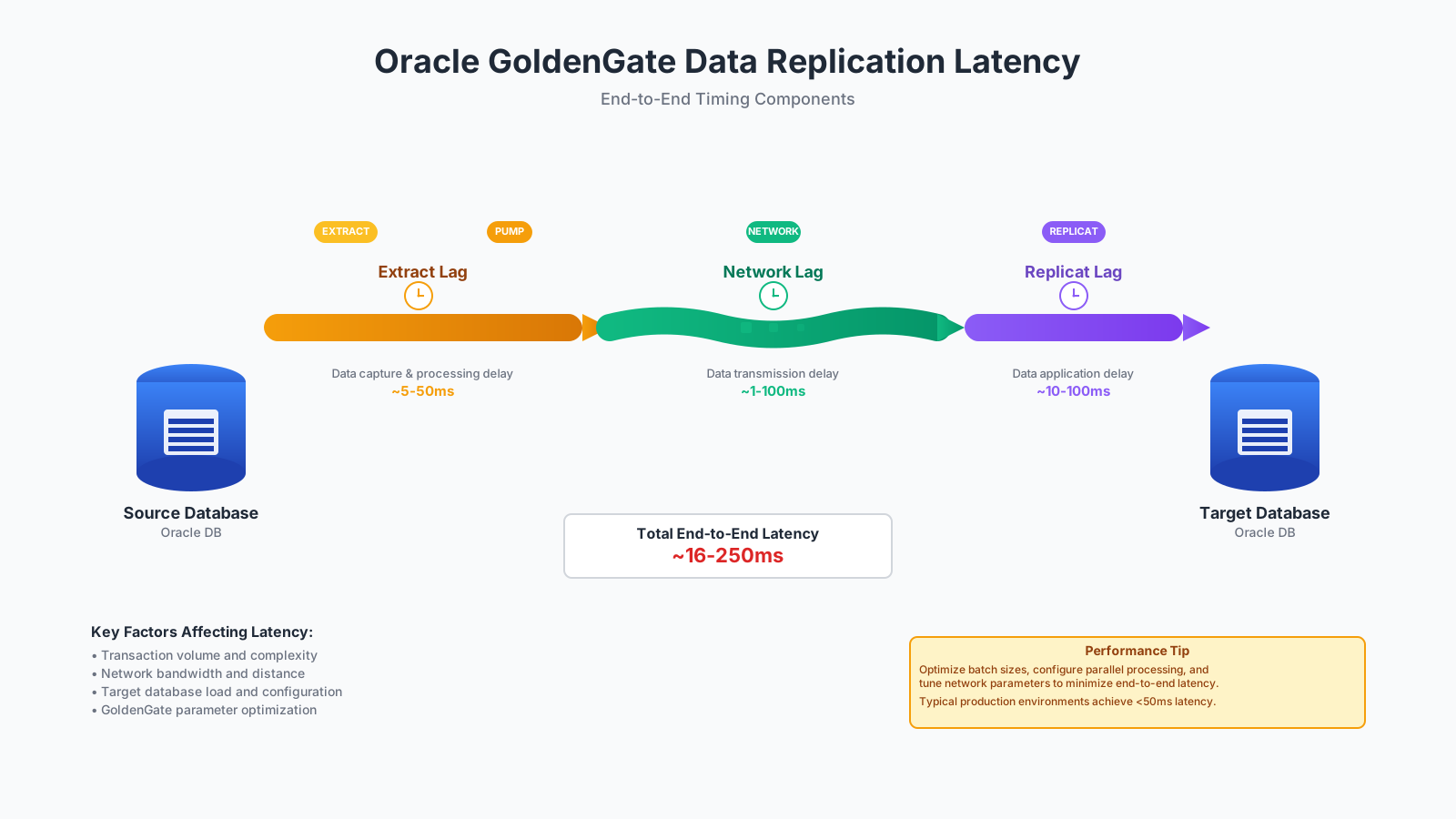
Before starting any diagnosis, we must have a precise and unified understanding of “Lag.” In the OGG pipeline, latency is not a single metric but an accumulation of delays from multiple stages. Understanding the meaning of each segment of lag is the cornerstone of locating the problem.
-
Extract Lag: This is the time difference from the moment a transaction is committed on the source database to the moment the Extract process captures this change from the Redo or Archive Log and writes it to a local Trail file. This lag primarily reflects the efficiency of the Extract process in reading and processing logs. For the Extract process, lag is the difference (in seconds) between the time a record is processed by Extract (based on the system clock) and the timestamp of that record in the data source.
-
Network Lag: This is the time it takes for data to be transferred from the source Trail file, across the network via a Data Pump process (or directly by the Extract process), and received and written to a remote Trail file by the target Collector process. This lag is a key indicator for assessing network bandwidth, stability, and the configuration of OGG network parameters (like
TCPBUFSIZE). -
Replicat Lag: This is the time difference from when the Replicat process reads a data change from the remote Trail file to when it successfully parses it into SQL and executes it on the target database. For the Replicat process, lag is the difference (in seconds) between the time the last record was processed by Replicat (based on the system clock) and the timestamp of that record in the trail file.
Together, these three components constitute the total end-to-end latency. When a user complains about slowness, your first task is to determine in which segment the delay is primarily occurring.
Chapter 2: The Diagnostic Toolkit - Native Commands Explained
OGG comes with a powerful set of command-line tools (GGSCI), which are your most direct and effective weapons for diagnosing latency.
1. INFO ALL: The Global Overview
This is your first command for a health check. It displays the status and latency information for all OGG processes (Manager, Extract, Replicat, etc.) in the environment.
GGSCI> INFO ALL

Program     Status      Group       Lag at Chkpt  Time Since Chkpt
-------------------------------------------------------------------
MANAGER     RUNNING
EXTRACT     RUNNING     EXT_ORA     00:00:02      00:00:05
REPLICAT    RUNNING     REP_ORA     00:15:30      00:00:03```
Key Interpretation:
- Status: Check if the process is in a
RUNNINGstate. If it’sABENDEDorSTOPPED, the problem is obvious. - Lag at Chkpt: This is the most critical latency indicator. It shows the lag between the timestamp of the data being processed and the source’s generation time at the last checkpoint. If Replicat’s
Lag at Chkptis consistently high (e.g., several minutes or hours), it clearly points to a slow apply process on the target. - Time Since Chkpt: This indicates how much time has passed since the last checkpoint was updated. If this value continuously increases, the process may be stuck, unable to complete its checkpoint, which is common when processing a very large transaction.
2. LAG [EXTRACT | REPLICAT]: Real-time Latency Probe
Unlike the INFO command, which reads historical data from the checkpoint file, the LAG command communicates directly with the process to get more real-time and accurate latency information.
GGSCI> LAG REPLICAT REP_ORA

Sending GETLAG request to REPLICAT REP_ORA...
Last record lag: 15 minutes, 32 seconds.
At EOF, no more records to process.
The LAG command provides the difference between the timestamp of the last record being processed and the current system time. During diagnosis, you can cross-verify the severity and real-time nature of the lag by combining the results of INFO ALL and LAG.
3. STATS [EXTRACT | REPLICAT]: Deep Performance Insight
Once you have identified a specific process (especially Replicat) as the bottleneck, the STATS command is your “microscope.” It provides detailed operational statistics to help you find performance bottlenecks.
GGSCI> STATS REPLICAT REP_ORA, TABLE HR.*, TOTAL, DAILY

Sending STATS request to REPLICAT REP_ORA...

Start of Statistics at 2025-08-07 06:30:00.
Replicating from HR.EMPLOYEES to HR.EMPLOYEES:
*** Total statistics since 2025-08-06 10:00:00 ***
        Total inserts:                           50000.00
        Total updates:                          250000.00
        Total deletes:                            1000.00
        Total operations:                       301000.00
Replicating from HR.DEPARTMENTS to HR.DEPARTMENTS:
*** Total statistics since 2025-08-06 10:00:00 ***
        Total inserts:                              10.00
        Total updates:                              25.00
        Total deletes:                               2.00
        Total operations:                           37.00
...
How to find problems from the STATS report?
- Identify Hot-Spot Tables: Using the
TABLE <schema>.*option, you can see the DML operation count for each table. If 99% of operations are concentrated on one or two tables, the problem likely lies with these “hot-spot tables.” - Evaluate Operation Types: Observe the ratio of
inserts,updates, anddeletes. A large number of updates, especially on tables without primary keys or indexes, or cascading updates, are often performance killers. - Calculate Throughput: By using the
REPORTTRATEoption (e.g.,reportrate min), you can see the number of operations processed per minute/hour, thereby quantifying the process’s throughput.
4. Log and Report File Analysis
- .rpt (Report File): Each OGG process generates a report file upon startup or shutdown. When a process
Abends(terminates abnormally), this file is your primary analysis target. It records detailed information about startup parameters, mapping relationships, and the specific error that caused the failure. - ggserr.log (Error Log): This is the central log file for the OGG environment, recording startups, shutdowns, errors, warnings, and important status information for all processes. Regularly reviewing
ggserr.logis a good habit for proactively identifying potential issues. You can configure Manager parameters (likeLAGCRITICALMINUTES) to write severe latency events as warnings to this log.
Chapter 3: Common Culprits of Latency and How to Find Them
By combining theory with tools, let’s now analyze some of the most common latency scenarios and their underlying culprits.
- Long-running Transaction
- Symptom:
Time Since Chkptcontinuously increases, whileLag at Chkptappears stable, but the actual total lag is accumulating. Extract or Replicat must wait for the entire transaction to be committed before it can update its checkpoint. - Identification: Query
v$transactionon the source database to find long-uncommitted transactions. In OGG, useSEND EXTRACT <ext_name>, SHOWTRANSto view the list of transactions currently being processed. - Solution: The core solution is to avoid large transactions. Push for application-side refactoring to break down large batch DML operations into smaller, more frequent commits.
- Symptom:
- Poor Target-side Performance
- Symptom: Replicat shows a significant
Lag at Chkpt. - Identification:
- Missing Indexes: Check the hot-spot tables in the
STATSreport and confirm that the corresponding tables on the target have primary keys or unique indexes. Table-scan-based UPDATE/DELETE operations without indexes are disastrous. - Database Locks/Wait Events: Run an AWR report or query wait events on the target database to see if the Replicat session is waiting for I/O, locks, CPU, or other resources.
- Fragmentation Issues: Excessive fragmentation of tables and indexes can also degrade DML performance.
- Missing Indexes: Check the hot-spot tables in the
- Symptom: Replicat shows a significant
- Network Jitter or Insufficient Bandwidth
- Symptom: The Data Pump or the remote Replicat experiences lag.
INFO ALLshows a smallLag at Chkptfor Extract, but a large lag for Replicat. - Identification: Use network tools like
pingandtracerouteto test the network quality between the source and target. Monitor network device traffic graphs to see if bandwidth is being maxed out. - Solution: Optimize OGG’s network parameters (e.g.,
TCPBUFSIZE,TCPFLUSHBYTES) or request that the network team increase bandwidth.
- Symptom: The Data Pump or the remote Replicat experiences lag.
- Improper
BATCHSQLConfiguration- Symptom: Replicat lag is high, but the target database load is not.
- Identification:
BATCHSQLimproves throughput by merging similar SQL statements into a single batch for execution. However, it may not be effective for scenarios with small transactions or diverse DML types and can even consume excessive memory. When row change data is large (e.g., over 5000 bytes), the benefit ofBATCHSQLdiminishes. For Integrated Replicat,BATCHSQLmight not take effect if the number of operations in a transaction exceeds theEAGER_SIZEthreshold. - Solution: This is a trade-off. For high-volume, homogeneous DML (like pure INSERTs),
BATCHSQLis a powerful tool. Otherwise, consider disabling it or tuning its parameters.
Chapter 4: Applying the Right Medicine - Performance Tuning in Practice
Once the problem is located, you need to apply precise measures.
BATCHSQL Parameter Example for Optimizing Replicat Performance
Suppose you are dealing with an ETL scenario dominated by high-volume INSERTs. You can configure the Replicat parameter file to maximize the effectiveness of BATCHSQL like this:
-- replicat parameter file: rep_ora.prm
REPLICAT REP_ORA
USERIDALIAS ogg_tgt DOMAIN OracleGoldenGate
-- BATCHSQL significantly improves performance for batch INSERTs
BATCHSQL
-- Increase the number of operations allowed in each batch
BATCHSQL_BATCH_OPS 2000
-- Increase the cacheable bytes in the queue to accommodate more batches
BATCHSQL_BYTESPERQUEUE 50000000
-- Increase the cacheable operations in the queue
BATCHSQL_OPSPERQUEUE 10000
Note: BATCHSQL consumes more memory. When tuning these parameters, monitor the Replicat process’s memory usage to avoid excessive consumption that could lead to system issues.
Chapter 5: Prevention is Better Than Cure - Building a Proactive Monitoring System
The highest level of operations is to prevent problems before they occur. Instead of waiting for alerts, build a proactive monitoring system to continuously track latency trends.
Shell Script: Periodically Record Latency Trends
You can write a simple shell script and run it via cron at regular intervals to log the output of INFO ALL, creating a history of latency.
#!/bin/bash

# ogg_lag_monitor.sh
# Define OGG home and log file paths
OGG_HOME=/u01/app/ogg/19c
LOG_FILE=/var/log/ogg/lag_monitor.log
GGSCI=$OGG_HOME/ggsci

# Get the current timestamp
TIMESTAMP=$(date "+%Y-%m-%d %H:%M:%S")

echo "--- Log Time: $TIMESTAMP ---" >> $LOG_FILE

# Execute ggsci command and append output to the log
$GGSCI << EOF >> $LOG_FILE
INFO ALL
EXIT
EOF

echo "" >> $LOG_FILE
Add this script to crontab, for example, to run every 5 minutes:
*/5 * * * * /path/to/ogg_lag_monitor.sh
To take it a step further, you can use a Python script to parse these logs or call OGG’s REST APIs directly to push latency data to professional monitoring platforms like Zabbix or Prometheus, enabling graphical visualization and intelligent alerting.
Conclusion: From Reactive Firefighting to Proactive Steering
When facing OGG latency issues, the key is to break out of the “black box” mindset and establish a clear diagnostic workflow.
OGG Latency Diagnostic Flowchart:
- Global Scan (
INFO ALL): Quickly determine which process (Extract, Pump, Replicat) is experiencing lag. - Precise Probe (
LAG): Confirm the real-time severity of the latency. - Deep Dive (
STATS): If Replicat is slow, analyze which table and what type of operation is the cause. - Correlated Analysis:
- Source Side: Check for large transactions.
- Target Side: Check for missing indexes, locks, and AWR reports.
- Network: Check connectivity and bandwidth.
- Optimization Implementation: Apply targeted adjustments (split transactions, add indexes, tune
BATCHSQL, etc.). - Continuous Monitoring: Establish automated monitoring scripts/systems to shift from reactive to proactive.
Remember, monitoring is the foundation, diagnosis is the key, and optimization is the goal. By mastering this methodology, the next time someone asks about the data sync status, you will no longer be a reactive “firefighter,” but a professional data architect who can confidently state, “The heartbeat is normal, processing XX thousand operations per minute.”