
In my experience with Oracle GoldenGate data synchronization projects, a recurring challenge is when a Replicat process runs slowly or abends, yet its report file is deceptively “clean” with no obvious error messages. Data is silently lost or becomes inconsistent, business users start complaining, and DBAs and data engineers are left staring at logs, completely stumped. This is the blind spot of traditional debugging methods.
When faced with such elusive issues, you need a tool that lets you look directly into the heart of the Replicat process. That tool is SHOWSYNTAX. It’s not just another logging parameter; it’s a powerful, interactive SQL debugger. After reading this article, you will be able to confidently use SHOWSYNTAX to precisely identify and resolve those tricky Replicat problems.
1. Demystifying SHOWSYNTAX: Your Interactive SQL Inspector
To understand the value of SHOWSYNTAX, we first need to grasp how it differs from other debugging tools.
-
Versus the Report File: The report file (
.rpt) records high-level events like the Replicat process starting, stopping, its lag, statistics, and final error results. It tells you “what” happened, but rarely “why.” It might report that an apply operation failed, but it won’t show you the “culprit” SQL statement after all transformations and mappings have been applied. -
Versus TRACE / TRACE2: The
TRACEparameter is extremely powerful, capable of logging internal OGG function calls, memory allocations, and detailed processing steps. However, this produces a massive volume of logs that are difficult for the average user to interpret. In my view,TRACEis like a “microscope” for low-level code debugging, whereasSHOWSYNTAXis more like a “magnifying glass” focused on business logic. It cares about only one thing: What does the final SQL statement that Replicat is about to commit to the target database actually look like?
The core principle of SHOWSYNTAX is to interrupt Replicat’s automated workflow. Before each DML statement (INSERT, UPDATE, DELETE) is applied to the target database, it prints the complete statement to the command line, pauses execution, and waits for your instruction. This gives you an invaluable opportunity to review, statement by statement, whether the results of data conversions, column mappings, and function calculations are what you expect.
The SHOWSYNTAX Workflow
To make it more intuitive, let’s visualize the SHOWSYNTAX workflow.
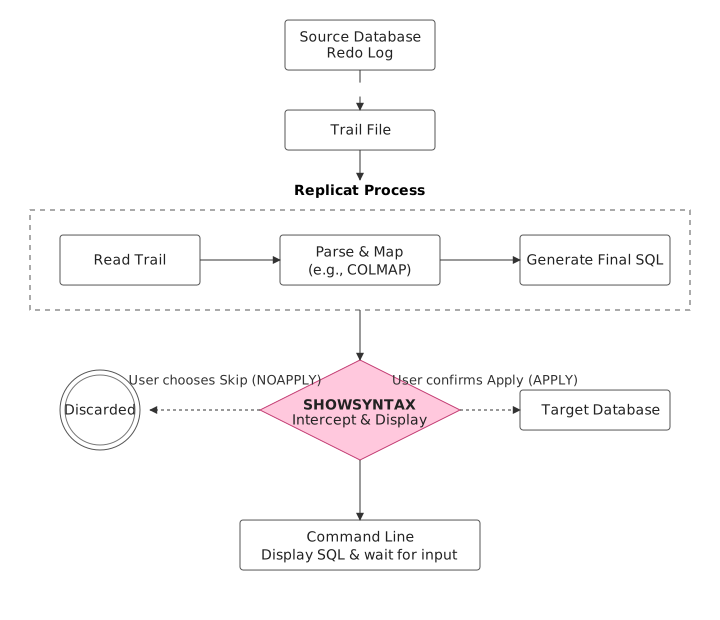
This diagram clearly shows how SHOWSYNTAX intercepts the process at the critical junction between SQL generation and its application to the target database, empowering us with robust debugging capabilities.
2. Hands-On Practice: Configuring and Using SHOWSYNTAX
Enough theory, let’s get our hands dirty. I’ll demonstrate a complete SHOWSYNTAX debugging session based on an OGG 19c environment.
Step 1: Modify the Replicat Parameter File
First, we need to add the SHOWSYNTAX parameter to the Replicat’s parameter file (.prm).
-- repabc.prm
REPLICAT repabc
-- Target database connection info
USERID ogguser@targetdb, PASSWORD your_password
-- Abort on error by default
REPERROR DEFAULT, ABEND

-- Enable SHOWSYNTAX and display LOB data up to 1MB
SHOWSYNTAX INCLUDELOB 1MB

-- Define the discard file
DISCARDFILE ./dirrpt/repabc.dsc, APPEND
-- Define the source-to-target table mapping
MAP tuser.t1, TARGET tuser.t2;
Key Parameter Breakdown:
SHOWSYNTAX: The core parameter that activates interactive debugging mode.[APPLY | NOAPPLY]: This sub-option is crucial.APPLY(the default) means that after the SQL is displayed, it will be applied to the target database if you choose to continue.NOAPPLYmeans it will only display the SQL and will never apply it to the database or write it to the discard file. This is a pure “read-only” inspection mode and is highly recommended when debugging in a production environment.INCLUDELOB [max_bytes | ALL]: By default,SHOWSYNTAXdoesn’t display the full content of LOB, XML, or UDT columns, showing a placeholder like<LOB data>instead. UseINCLUDELOBto reveal this data. You can specify a maximum size (e.g.,1M,10K) or useALLto display the entire content.
Step 2: Start Replicat from the Command Line
This is a common pitfall: A Replicat process configured with SHOWSYNTAX cannot be started from within GGSCI. If you try to START REPLICAT repabc in GGSCI, you will immediately get an OGG-01991 error.
The correct way is to open an operating system command line (shell), navigate to the OGG installation directory, and run the Replicat program directly.
$ ./replicat paramfile dirprm/repabc.prm
Step 3: Interactively Inspect the SQL
As soon as there’s a data change on the source, the running Replicat process will print the first SQL statement ready for application to the screen and pause.
2024-12-02 17:58:44 INFO OGG-06510 Using the following key columns for target table TUSER.T2: ID.

INSERT INTO "TUSER"."T2" ("ID", "NAME", "DESCRIPTION", "CLOB_DATA", "CATE") VALUES
('1','zhang', 'YkilH...', 'NATPA0...', TO_TIMESTAMP('2024-12-02 17:00:40...'))
Statement length: 4,203

(S)top display, (K)eep displaying (default):
At this point, you have two choices:
- Press Enter (default is K): “Keep Displaying.” This executes the current SQL statement and continues to the next one.
- Type S and press Enter: “Stop Display.” This executes the current SQL statement and then exits interactive mode, allowing Replicat to resume automated batch processing without displaying each statement.
This way, you can review Replicat’s work one statement at a time until you find the problematic SQL.
3. Typical Use Cases and Troubleshooting Strategies
SHOWSYNTAX is immensely useful in the following scenarios:
Scenario 1: Debugging Complex Data Transformations and COLMAP Logic
Pain Point: When you use complex column-conversion functions like @IF, @CASE, or @STRCAT in your MAP statement, and the target data doesn’t look right, it’s hard to tell if the issue is with the source data or your function logic.
Troubleshooting Approach:
- Add
SHOWSYNTAX NOAPPLYto the Replicat parameter file. TheNOAPPLYoption ensures your debugging won’t corrupt the target data. - Start Replicat from the command line.
- When an
INSERTorUPDATEstatement with complex transformations appears on the screen, carefully check the values in theVALUES (...)clause or theSETclause. - Example: If you configured
COLMAP (USEDEFAULTS, T_STATUS = @CASE(S_CODE, 'A', 'Active', 'I', 'Inactive', 'Unknown')),SHOWSYNTAXwill directly displayUPDATE "TARGET_TABLE" SET "T_STATUS" = 'Active' WHERE .... This lets you see at a glance if theS_CODEvalue was converted correctly.
Scenario 2: Diagnosing Replicat Performance Issues
Pain Point: Replicat process lag is steadily increasing, but there are no locks or obvious performance bottlenecks on the target database, and the report file is clean.
Troubleshooting Approach:
SHOWSYNTAX can help you discover if Replicat is generating “inefficient” SQL.
- Check the
WHEREclause: In one case I handled, a client’s Replicat was extremely slow. UsingSHOWSYNTAX, we discovered that because of anUPDATEon a source table with no primary key, Replicat was generatingUPDATEstatements where theWHEREclause included every single column of the table. This caused a full table scan on the target for every update. The report file will never tell you this, butSHOWSYNTAXmakes it impossible to miss. - Batch Processing Interruption:
SHOWSYNTAXpausesBATCHSQLmode. While this itself reduces performance, by observing the structure of individual statements, you can determine if there’s anything that might be breaking batch optimization (e.g., frequently mixing different DML types).
Scenario 3: Handling Special Character Sets and LOB Data
Pain Point: After data synchronization, you see corrupted characters (mojibake) on the target, or LOB field content is incomplete.
Troubleshooting Approach:
- Character Set Issues:
SHOWSYNTAXdisplays non-printable characters (U+0000 to U+001F) in hexadecimal format (\xx). If you see a lot of these escape sequences in the output, you need to check the character set configurations on the source and target, as well as theSOURCECHARSETparameter in OGG. - LOB Data Truncation: If you suspect LOB data is being lost during synchronization, you can use
SHOWSYNTAX INCLUDELOB ALLto display the full LOB content and compare it with the source. This is especially useful for debugging the synchronization of LOB-based XML or JSON fields.
4. Expert Advice and Pitfalls to Avoid
SHOWSYNTAX is a sharp tool, but it must be used correctly. Here are my key recommendations:
NOAPPLYis Your Safety Net: In any situation where you are unsure if you might affect data, always useSHOWSYNTAX NOAPPLYfirst. This allows you to inspect the SQL in a completely risk-free manner.- It’s a Debugging Tool, Not a Monitoring Tool: Due to its interactive and single-threaded nature,
SHOWSYNTAXwill significantly increase data latency. It should only be used to diagnose problems and should be removed from the parameter file immediately after the issue is resolved. - No Support for Coordinated or Parallel Replicat:
SHOWSYNTAXcannot be used with Coordinated Replicat or Parallel Replicat modes. In these scenarios, Oracle recommends enablingsqltracefor the associated database apply processes as an alternative. - Mutually Exclusive with
BATCHSQL: WhenSHOWSYNTAXis running,BATCHSQLoptimization is automatically paused. After debugging, restarting Replicat withoutSHOWSYNTAXwill automatically resumeBATCHSQL.
Summary
For a quick review, here is a comparison of the main debugging tools in OGG:
| Tool | Core Purpose | When to Use |
|---|---|---|
SHOWSYNTAX |
Interactive SQL Inspector | Debugging MAP logic, data conversions, or performance issues caused by specific SQL generated by Replicat. |
Report File (.rpt) |
High-Level Run Summary | Daily health checks, error reporting, and lag monitoring. |
| Logdump | Trail File Content Viewer | Viewing the raw data records in the trail file for analysis before the data reaches Replicat. |
TRACE |
Low-Level Internal Tracer | Deep-diving into OGG internals to analyze function calls, buffer issues, etc. Typically used under guidance from Oracle Support. |
Mastering SHOWSYNTAX is like having a pair of X-ray glasses that can see right through Replicat. It might seem a bit “old-school,” requiring command-line operation, but the clarity and certainty it provides for solving specific, tricky Replicat problems is irreplaceable. Think of it as a scalpel in your OGG toolbox—when you need precision, it will undoubtedly help you get the job done.