
This document aims to introduce the classification, application scenarios, and recommended usage of indexes associated with partitioned tables in ORACLE databases through a Q&A format.
Regarding the common concern of whether to create partitioned indexes or global indexes on partitioned tables, refer to the following Q&A:
- What are the classifications of indexes on partitioned tables?
- What are the pros and cons of the three types of indexes mentioned above?
- What are the classifications of partitioned indexes?
- What are the pros and cons of the three types of partitioned indexes mentioned above?
- What is the performance impact of local indexes?
- What is the performance impact of global indexes?
- Why do indexes on partitioned tables become UNUSABLE?
- How to maintain partitioned tables
- How to choose which type of index to create?
- Syntax Examples
When creating Global Nonpartitioned indexes on partitioned tables, issues like index invalidation can occur during scheduled partition maintenance (e.g., dropping partitions older than three months at the start of each month for a monthly partitioned table).
The “update index” clause can be used to simultaneously update global indexes and avoid invalidation. However, maintaining indexes involves significant block changes, risking performance issues (Parallel DML operations, competition occurs, leading to “enq : TX - index contention” and “gc” wait events).
Starting from 12c, the “Global Index Delayed Maintenance” feature was introduced, Reduced load when “drop partition”. However, it might cause large-scale concentrated processing when the “Global Index Delayed Maintenance JOB” runs, potentially causing performance issues.
We have encountered the above issues with several customers. Based on practical experience, considering system stability (avoiding impact on other OLTP processing during Global index maintenance), we recommend designing more efficient Local indexes and modifying SQL statement WHERE clauses to avoid using Global indexes.
Common Questions about Partitioned Table Indexes:
1. What are the classifications of indexes on partitioned tables?
Indexes associated with partitioned tables are mainly divided into Global Indexes and Local Indexes, defined as follows:
Global Indexes:
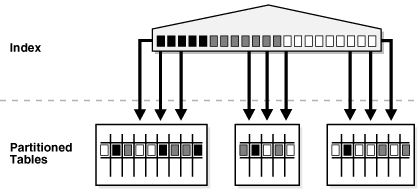
Also known as the “Global Index”, these are indexes containing index keys pointing to more than one table partition.
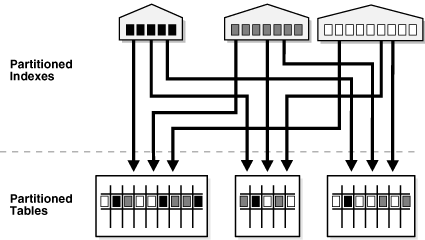
Global indexes include Global Partitioned Indexes (Global Partitioned index) and Global Nonpartitioned Indexes (Global Nonpartitioned index).
Global Partitioned Index
Global Nonpartitioned index
Local Indexes:
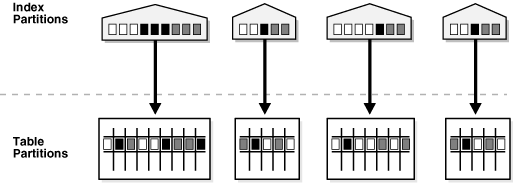
Also known as Local indexes or Local Partitioned Indexes, these are indexes partitioned on the same columns as the table, with the same number of partitions and partition boundaries. Therefore, each index partition is associated with a single underlying table partition, meaning all keys in an index partition refer only to rows stored in its corresponding single table partition.
Local Partitioned Index
2. What are the pros and cons of the three types of indexes mentioned above?
Typically, a table is designed as a partitioned table for two main reasons:
- Reduce the amount of underlying data (or records) that need to be scanned when accessing table data (Partition pruning - “Partition pruning”).
- Reduce the load during historical data maintenance (e.g., regularly deleting historical data).
In achieving these two goals, the differences between Local Indexes (Local Index), Global Partitioned Indexes (Global Partitioned index), and Global Nonpartitioned Indexes (Global Nonpartitioned index) are as follows:
| Local Partitioned Index | Global Partitioned index | Global Nonpartitioned index | |
|---|---|---|---|
| Partition Pruning | High Enables partition pruning for both table and index |
Medium Enables partition pruning on the index |
Low Cannot achieve partition pruning |
| Historical Data Maintenance Cost | Low Table and index partitions can be maintained simultaneously without affecting other partitions |
Medium Maintaining table partitions may affect multiple index partitions |
High Maintaining table partitions may affect the entire index |
As shown, Local Indexes (Local Index) are the best method to achieve the above two goals. Global Nonpartitioned Indexes (Global Nonpartitioned index) offer almost no advantages and should only be considered when retrieval conditions cannot specify the partition key. Global Partitioned Indexes (Global Partitioned index) are a compromise between the first two.
Therefore, to leverage the advantages of partitioned tables, we recommend using partitioned indexes (Partition Index) whenever possible.
3. What are the classifications of partitioned indexes?
Based on the relationship between the partition key and index columns, partitioned indexes are further classified into Local Prefixed Indexes (Local Prefixed Index), Local Nonprefixed Indexes (Local Nonprefixed Index), and Global Prefixed Partitioned Indexes (Global Prefixed Partitioned Index). Definitions are as follows:
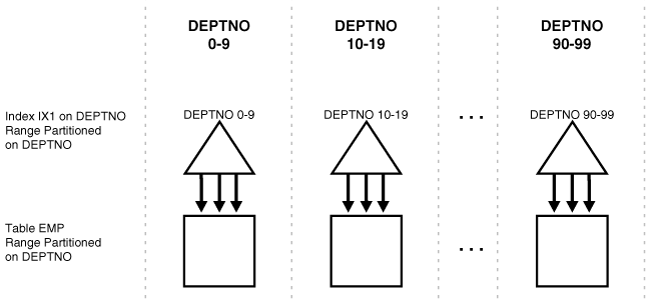
Local Prefixed Index: A local index partitioned on the left prefix of the index columns, where the partition key is included in the index key. Local prefixed indexes can be unique or non-unique.
Example:
If the ‘emp’ table and its local index ‘ix1’ are partitioned on the ‘deptno’ column, then if index ‘ix1’ is defined on columns (deptno, other_columns), it is a Local Prefixed Index.
Local Prefixed Index
Local Nonprefixed Index: A local index not partitioned on the left prefix of the index columns, or whose index key does not contain the partition key. A unique local nonprefixed index is impossible unless the partition key is a subset of the index key.
Example:
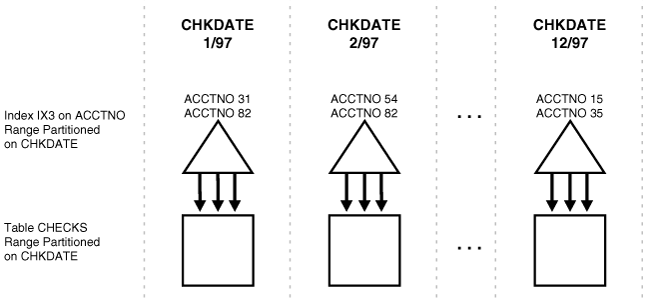
If the ‘checks’ table and its local index ‘ix3’ are partitioned on the ‘chkdate’ column, then if index ‘ix3’ is defined on column (acctno), it is a Local Nonprefixed Index.
Local Nonprefixed Index
Global Partitioned Index:
If a global index is partitioned differently than the underlying table, it is called a Global Partitioned Index (Global Partitioned Index). Global partitioned indexes only support prefixed indexing, meaning the partition key of the index is the left prefix of the index columns. Oracle Database does not support non-prefixed global partitioned indexes.
Global prefixed partitioned indexes can be unique or non-unique. Nonpartitioned indexes are considered Global Prefixed Nonpartitioned Indexes.
Example:
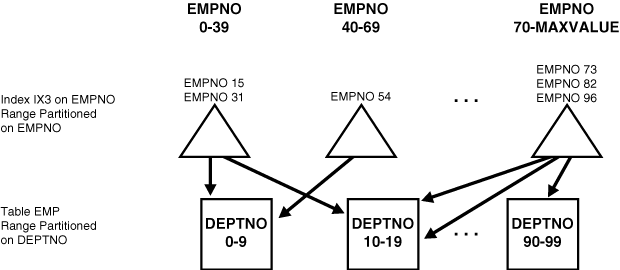
If the ‘emp’ table is partitioned on the ‘deptno’ column, and index ‘ix3’ is partitioned on the ‘empno’ column, then if index ‘ix3’ is defined on columns (empno, other_columns), it is a Global Prefixed Partitioned Index.
Global Prefixed Partitioned Index
4. What are the pros and cons of the three types of partitioned indexes mentioned above?
Here is a structural comparison of these 3 types of indexes:
| Index & Table Same Partition | Partition Key is Left Prefix of Index Columns | Example: Table Partition Key | Example: Index Partition Key | Example: Index Columns | |
|---|---|---|---|---|---|
| Local Prefixed Index Any Partitioning (Range, Hash, etc.) |
Yes | Yes | A | A | A,B |
| Local Nonprefixed Index Any Partitioning (Range, Hash, etc.) |
Yes | No | A | A | B,A |
| Global Prefixed Index Range Partitioning |
No | Yes | A | B | B |
Here is a comparison of other characteristics:
| Allows Unique? | Management Difficulty | For OLTP Applications (Online Transaction Processing) |
For DSS Applications (Decision Support Systems) |
|
|---|---|---|---|---|
| Local Prefixed Index Any Partitioning (Range, Hash, etc.) |
Yes | Easy | Good | Good |
| Local Nonprefixed Index Any Partitioning (Range, Hash, etc.) |
Yes | Easy | Bad | Good |
| Global Prefixed Index Range Partitioning |
Yes | Harder | Good | Not Good |
As shown, the Local Prefixed Index (Local Prefixed Index) performs best across all evaluated characteristics. The other two types have their own pros and cons and require assessment before use.
Therefore, without specific requirements, we recommend using Local Prefixed Indexes (Local Prefixed Index) among partitioned indexes whenever possible.
5. What is the performance impact of local indexes?
- Increased System Availability: Operations causing data invalidation or unavailability in a partition only affect that partition.
- Simplified Partition Maintenance: When moving a table partition, only the associated local index partition needs to be rebuilt or maintained.
- Partition Pruning: During SQL execution on the partitioned table, the ‘WHERE’ clause can prune partitions (automatically filter out partitions that don’t need to be accessed).
- Simplified Tablespace Point-in-Time Recovery (PITR): To recover a table partition or subpartition to a point in time, the corresponding index entries must also be recovered to the same point. Using local indexes is the only way to achieve this.
In summary, when our application accesses data using the partition key or the partition key combined with other fields, Local Prefixed Indexes are the preferred choice.
When using Local Nonprefixed Indexes, if the query condition does not include the partition key, all partitions must be scanned. Partition pruning only occurs if the partition key is included.
Using table T1 as an example (partitioned on field C1), with a Local Nonprefixed Index ‘idx_ind2’ created on fields (C2, C3):
select * from t1 where c2=‘20170609’ and c3=’1’ ;
------ When query condition does NOT include partition key, uses index idx_ind2 but scans ALL partitions
-----------------------------------------------------------------------------------------------------------------------
| Id | Operation                                 | Name      | Rows | Bytes | Cost (%CPU)| Time     | Pstart| Pstop |
-----------------------------------------------------------------------------------------------------------------------
|  0 | SELECT STATEMENT                          |           |   10 |   250 |     2   (0)| 00:00:01 |       |       |
|  1 |  PARTITION RANGE ALL                      |           |   10 |   250 |     2   (0)| 00:00:01 |     1 |    10 |
|  2 |   TABLE ACCESS BY LOCAL INDEX ROWID BATCHED| T1       |   10 |   250 |     2   (0)| 00:00:01 |     1 |    10 |
|* 3 |    INDEX RANGE SCAN                       | IDX_IND2 |   10 |       |     1   (0)| 00:00:01 |     1 |    10 |
-----------------------------------------------------------------------------------------------------------------------
select * from t1 where c2=‘20170609’ and c3=’1’ and C1=’20160609’;
------ When query condition INCLUDES partition key, uses index idx_ind2 and scans a SINGLE partition.
------ (Global Nonpartitioned indexes cannot achieve partition pruning even if the partition key is included).
-----------------------------------------------------------------------------------------------------------------------
| Id | Operation                                 | Name      | Rows | Bytes | Cost (%CPU)| Time     | Pstart| Pstop |
-----------------------------------------------------------------------------------------------------------------------
|  0 | SELECT STATEMENT                          |           |   99 |  2475 |     2   (0)| 00:00:01 |       |       |
|  1 |  PARTITION RANGE SINGLE                   |           |   99 |  2475 |     2   (0)| 00:00:01 |    10 |    10 |
|* 2 |   TABLE ACCESS BY LOCAL INDEX ROWID BATCHED| T1       |   99 |  2475 |     2   (0)| 00:00:01 |    10 |    10 |
|* 3 |    INDEX RANGE SCAN                       | IDX_IND2 |  100 |       |     1   (0)| 00:00:01 |    10 |    10 |
-----------------------------------------------------------------------------------------------------------------------
6. What is the performance impact of global indexes?
-
Useful for Fast Access, Integrity & Availability: In OLTP systems, a table might be partitioned on one key (e.g., employees.department_id), but applications may need to access data across partitions using many different keys (e.g., employee_id or job_id). Global indexes are useful in these cross-partition data access scenarios.
-
Harder Management: During table partition maintenance (e.g., Dropping historical partitions), all partitions of a global index can be affected.
-
Potential Performance Improvement for High Contention: In multi-user OLTP environments with high contention on few leaf blocks, hash index partitioning can improve index performance.
In summary, when our application accesses data across multiple partitions (query condition does not include the partition key), global indexes can be considered based on the application’s actual needs. However, using global indexes means accepting the associated maintenance costs during later partition maintenance operations.
7. Why do indexes on partitioned tables become UNUSABLE?
By default, many table maintenance operations on partitioned tables invalidate (mark as UNUSABLE) global indexes and the affected local index partitions. When performing partition maintenance on the table, all partitions of a global index are affected. You must then rebuild the entire index or each affected index partition.
Whether the operation marks the affected index partitions as unavailable depends on the partition type (for example, for a range partitioned table, adding a partition does not mark the global and affected local indexes as unavailable, but it might do so for a hash partitioned table).
8. How to maintain partitioned tables
Generally, if we need to clean up data for an entire partition, we recommend using DROP PARTITION or TRUNCATE PARTITION. Using DELETE to clean an entire partition is inefficient and incurs additional usage and maintenance costs later. As mentioned, during partition maintenance, we need to consider whether indexes will become UNUSABLE, so we must maintain indexes simultaneously during partition maintenance.
Specify the UPDATE INDEXES clause for the maintenance operation in your ALTER TABLE statement. This clause instructs the database to update indexes (both global and affected local index partitions) while executing the maintenance DDL statement.
To update only global indexes, use the UPDATE GLOBAL INDEXES clause.
The following operations support the UPDATE INDEXES clause:
ADD      PARTITION | SUBPARTITION
COALESCE PARTITION | SUBPARTITION
DROP     PARTITION | SUBPARTITION
EXCHANGE PARTITION | SUBPARTITION
MERGE    PARTITION | SUBPARTITION
MOVE     PARTITION | SUBPARTITION
SPLIT    PARTITION | SUBPARTITION
TRUNCATE PARTITION | SUBPARTITION
Notable impacts when specifying UPDATE INDEXES:
-
Execution time of the partition DDL statement is longer because indexes that would otherwise be marked UNUSABLE are now updated.
-
A rule of thumb is that updating indexes is relatively faster if the partition size is less than 5% of the table size.
Note:
Starting in 12c, the “Global Index Delayed Maintenance” feature was introduced, optimizing global index maintenance related to DROP and TRUNCATE table partition operations. Global index maintenance can be scheduled independently of the DROP or TRUNCATE operation. Until global index maintenance is complete, any queries, DDL, or DML against the partitioned table will ignore invalid entries in the global index. (This feature relies on the ability to create indexes on a subset of table partitions, so marking the entire global index unusable on the table is no longer necessary.)
-
When you update a table with global indexes, the indexes are updated in-place. The index updates are logged, generating redo and undo records. In contrast, if you manually rebuild the entire global index, you can do it in NOLOGGING mode. Additionally, manual rebuilding might create a more compact and efficient index.
-
If an index or index partition was unusable before the partition maintenance operation, it remains unusable after the operation, even if the update indexes clause is specified.
9. How to choose which type of index to create?
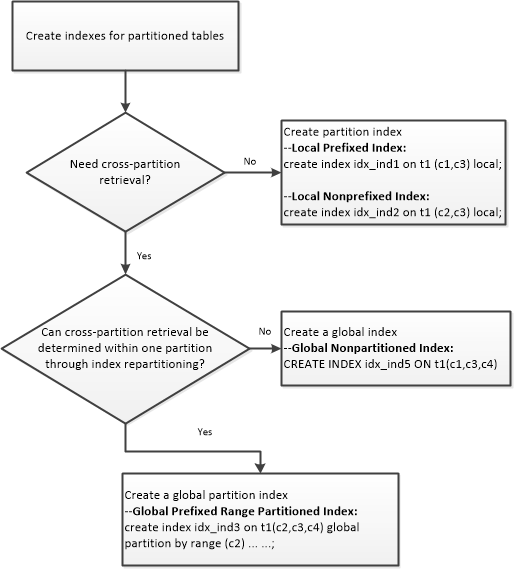
Refer to the following decision tree when selecting an index type:
Table T1 partitioned by field c1
10. Syntax Examples
–Create table for test:
DROP TABLE t1;
CREATE TABLE t1(
c1 CHAR (8) NOT NULL
,c2 CHAR (8) NOT NULL
,c3 NUMBER (22,4) NOT NULL
,c4 NUMBER (22,4) NOT NULL
)
PARTITION BY RANGE (c1)
(
PARTITION t_p1 VALUES LESS THAN('20160601')
,PARTITION t_p2 VALUES LESS THAN('20160602')
,PARTITION t_p3 VALUES LESS THAN('20160603')
,PARTITION t_p4 VALUES LESS THAN('20160604')
,PARTITION t_p5 VALUES LESS THAN('20160605')
,PARTITION t_p6 VALUES LESS THAN('20160606')
,PARTITION t_p7 VALUES LESS THAN('20160607')
,PARTITION t_p8 VALUES LESS THAN('20160608')
,PARTITION t_p9 VALUES LESS THAN('20160609')
,PARTITION t_P10 VALUES LESS THAN (MAXVALUE)
);

begin
for i in 0 .. 9 loop
for j in 1 .. 100 loop
insert into t1 values('2016060'||to_char(i) ,'2017060'||to_char(i),10-i,10000-j);
commit;
end loop;
end loop;
end;
/
–Local Prefixed Index:
create index idx_ind1 on t1 (c1,c3) local;
–Local Nonprefixed Index:
create index idx_ind2 on t1 (c2,c3) local;
–Global Prefixed Range Partitioned Index:
CREATE INDEX idx_ind3 ON t1(c2,c3,c4)
GLOBAL PARTITION BY RANGE (c2)
(
 PARTITION t_p1 VALUES LESS THAN('20170601')
,PARTITION t_p2 VALUES LESS THAN('20170602')
,PARTITION t_p3 VALUES LESS THAN('20170603')
,PARTITION t_p4 VALUES LESS THAN('20170604')
,PARTITION t_p5 VALUES LESS THAN('20170605')
,PARTITION t_p6 VALUES LESS THAN('20170606')
,PARTITION t_p7 VALUES LESS THAN('20170607')
,PARTITION t_p8 VALUES LESS THAN('20170608')
,PARTITION t_p9 VALUES LESS THAN('20170609')
,PARTITION t_P10 VALUES LESS THAN (MAXVALUE)
);
–Global Prefixed Hash Partitioned Index:
create index idx_ind4 on t1 (c1,c2,c3) global partition by hash (c1) partitions 64;
–Global Nonpartitioned Index:
CREATE INDEX idx_ind5 ON t1(c1,c3,c4) GLOBAL;
–Check index status
col owner for a20
col index_name for a20
col index_type for a20
col table_name for a20
col partitioned for a20
set lin 300 pages 999
select OWNER,INDEX_NAME,INDEX_TYPE,TABLE_NAME,PARTITIONED
from dba_indexes
where TABLE_NAME='T1';
OWNER                INDEX_NAME           INDEX_TYPE           TABLE_NAME           PARTITIONED
-------------------- -------------------- -------------------- -------------------- ----------------
TEST                 IDX_IND1             NORMAL               T1                   YES
TEST                 IDX_IND2             NORMAL               T1                   YES
TEST                 IDX_IND3             NORMAL               T1                   YES
TEST                 IDX_IND4             NORMAL               T1                   YES
TEST                 IDX_IND5             NORMAL               T1                   NO
select owner,index_name,table_name,partitioning_type,
partition_count,partitioning_key_count,locality,alignment
--subpartitioning_type,def_subpartition_count,subpartitioning_key_count
from DBA_PART_INDEXES where TABLE_NAME='T1';
OWNER INDEX_NAME TABLE_NAME PARTITION PARTITION_COUNT PARTITIONING_KEY_COUNT LOCALI ALIGNMENT
------- ------------ ----------- --------- --------------- ---------------------- ------ ------------
TEST   IDX_IND1    T1         RANGE     10              1                     LOCAL  PREFIXED
TEST   IDX_IND2    T1         RANGE     10              1                     LOCAL  NON_PREFIXED
TEST   IDX_IND3    T1         RANGE     10              1                     GLOBAL PREFIXED
TEST   IDX_IND4    T1         HASH      64              1                     GLOBAL PREFIXED
References:
Example of Script to Create Local Prefixed Partitioned Index (Doc ID 165938.1)
Script to Create Local Non-Prefixed Partitioned Index (Doc ID 166112.1)
Example of Script to Create a Global Prefixed Partitioned Index (Doc ID 165656.1)
Intelligent Rewrite with UNION ALL / Table Expansion in the Presence of Unusable local Index Partition or Partial Index (Doc ID 1638318.1)
Bug 10258337 - Unusable index segment not removed for “ALTER TABLE MOVE” (Doc ID 10258337.8)
Common Maintenance Commands That Cause Indexes to Become Unusable (Doc ID 165917.1)
How to Drop/Truncate Multiple Partitions in Oracle 12C (Doc ID 1482264.1)
Common Questions on Indexes on Partitioned Table (Doc ID 1481609.1)
How to Create Partial Global/Local Indexes for Partitioned Tables in Oracle 12c (Doc ID 1482460.1)
11.2 New Feature: Unusable Indexes and Index Partitions Do Not Consume Space (Doc ID 1266458.1)
How to Create Primary Key Partitioned Indexes (Doc ID 74224.1)
How Do Indexes Become Unusable? (Doc ID 1054736.6)
https://docs.oracle.com/en/database/oracle/oracle-database/19/vldbg/index-partitioning.html