
As a data integration specialist with over 12 years of experience in Oracle GoldenGate (OGG) projects, there’s a question that arises at nearly every new project kickoff: “Should we use Classic Extract or Integrated Extract?”
This is by no means a simple choice of “new is always better.” Many teams have a vague understanding that “Integrated is new, Classic is old,” but when faced with specific business scenarios—such as a high-load RAC cluster source, frequent DDL changes, or extreme sensitivity to source system performance—a clear, well-reasoned decision becomes critical. The wrong choice can turn into an operational nightmare down the line.
Today, I’ll take you under the hood of these two modes, from their working principles to performance bottlenecks, to thoroughly clarify their differences. After reading this article, you will be able to confidently choose the most suitable architecture for your project and clearly articulate the “why” to your team and management.
1. How They Work: The Fundamental Difference
To make the right choice, we must first understand that they take two completely different paths to read database logs.
Classic Extract: The Solitary Log Reader
Classic Extract operates in a very direct manner: as an independent external process, it directly and sequentially reads Oracle’s online Redo Log files or Archive Logs.
You can think of it as a diligent but lonely librarian who can only stand outside the library, reading books (Redo/Archive Logs) one by one as they are passed through a fixed window.
Workflow Diagram:
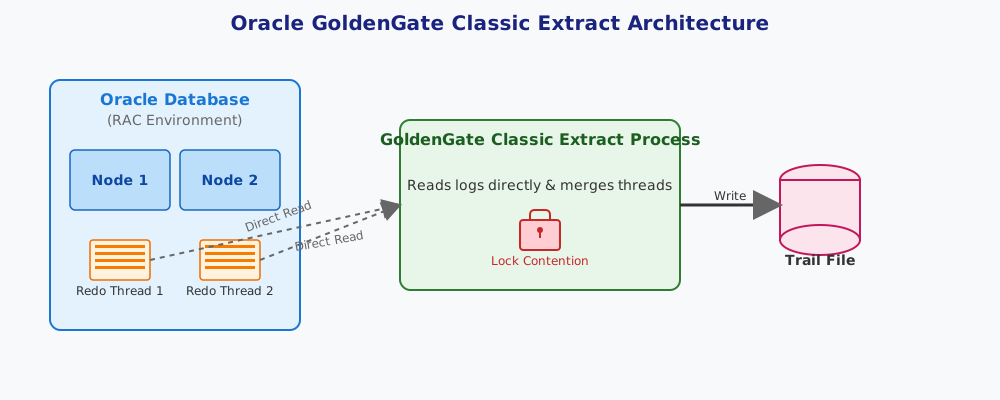
The advantage of this mode is its simplicity and independence. However, in high-concurrency environments, especially RAC (Real Application Clusters), its bottlenecks become apparent:
- Lock Contention in RAC Environments: In a RAC environment, each node generates its own Redo Thread. To ensure data consistency, Classic Extract needs to read logs from different nodes and merge-sort them by SCN (System Change Number). This process is like a librarian trying to handle books from multiple windows simultaneously and having to sort them by their original page numbers—it’s highly inefficient and often leads to significant latency while waiting for a node’s logs. This is the “original sin” of Classic mode in a RAC environment.
- Limited DDL Support: Classic mode’s support for DDL (Data Definition Language) is clumsy, requires extra configuration, supports a limited number of DDL types, and is very cumbersome to handle.
Integrated Extract: The ‘Inside Agent’ Deep Within the Database
Unlike the “outsider” status of Classic mode, Integrated Extract is our “insider” planted within the Oracle database. It no longer reads physical log files directly but is deeply integrated with a database component called the Logmining Server.
Imagine that instead of making the librarian wait outside, we send him directly into the library’s core—the cataloging center (Logmining Server). The log stream (Logical Change Records, LCRs) generated by the database itself is continuously fed into this center, and Integrated Extract is right there, acquiring the data it needs in the most efficient way.
Workflow Diagram:
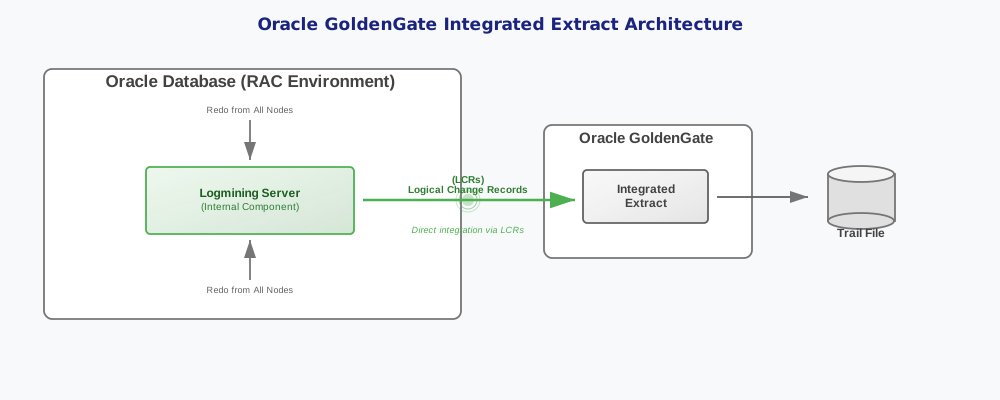
This “internal collaboration” model fundamentally solves the pain points of Classic mode:
- Native RAC Support: Because Integrated Extract works at the database’s unified log stream level, it naturally sees the merged data from all nodes, completely avoiding cross-node log reading and sorting issues. Its support for RAC is seamless and efficient.
- Powerful DDL Support: DDL operations are directly converted into LCRs internally by the database. Integrated Extract can capture and process DDL just as easily as DML, without complex additional configuration.
- Friendlier to the Source: It handles advanced features like compression and encryption better, and as an internal database component, its resource scheduling and management are more intelligent.
2. Core Differences: Performance, Features, and Code in Practice
Theoretical advantages and disadvantages must ultimately translate into tangible differences in performance and functionality. Let’s look at some practical code examples to see how they manifest in OGG 19c/21c.
Code in Practice: Parameter Files and Registration
Classic Extract Parameter File (cext.prm)
This is a very traditional configuration where you need to explicitly tell Extract where to read the logs.
-- Classic Extract process cext
EXTRACT cext
-- Identity, using traditional user/password
USERIDALIAS ogg_admin_alias
-- Directly specify Redo log threads and archive log location
TRANLOGOPTIONS DBLOGREADER
-- Write to local Trail file
EXTTRAIL ./dirdat/lt
-- Tables to be extracted
TABLE hr.*;
Integrated Extract Parameter File (iext.prm) and Registration
The configuration looks cleaner because it doesn’t need to worry about physical log locations.
-- Integrated Extract process iext
EXTRACT iext
-- Identity, must be DBLOGIN, using database authentication
USERIDALIAS ogg_admin_alias
-- Declare supplemental logging for all columns to support conflict detection
LOGALLSUPCOLS
-- Write to local Trail file
EXTTRAIL ./dirdat/li
-- Tables to be extracted
TABLE hr.*;
The crucial step is that Integrated Extract must be “registered” with the database, telling it: “Please start preparing the data stream for me (iext).”
-- Log in to the database
DBLOGIN USERIDALIAS ogg_admin_alias
-- Register the Extract process
REGISTER EXTRACT iext DATABASE
Operational Monitoring: Checking Status and Lag
Monitoring is at the core of daily operations, and the monitoring methods for the two modes differ.
Universal Lag Check Command This command applies to both modes and is the most direct way to check for lag.
-- Execute in GGSCI
LAG EXTRACT iext
Integrated Extract-Specific Status Query Since Integrated Extract is part of the database, we can view its more detailed internal status through DBA views, which is impossible with Classic mode.
-- Query using a DBA user
SELECT
    capture_name,
    state,
    total_messages_captured,
    total_messages_enqueued
FROM
    v$goldengate_capture;
Through this view, you can see the state of the extract process (e.g., CAPTURING CHANGES) and how many LCRs have been captured, which is very helpful for in-depth troubleshooting.
3. Selection Guide: Which One Should You Use?
After discussing all the principles and code, let’s return to the original question: how do you choose? In my opinion, the decision path is actually very clear.
Decision Tree Guide:
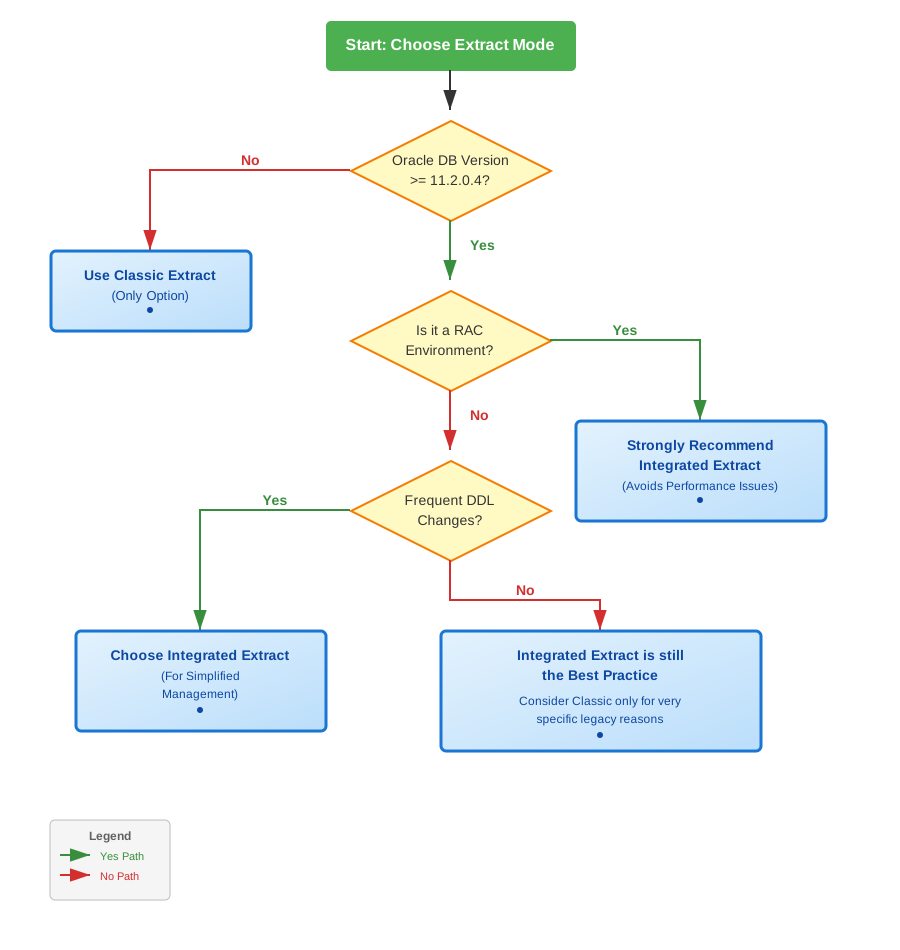
Here is a quick decision checklist I’ve prepared for you:
- Database Version is the First Hurdle
- If your Oracle database version is below 11.2.0.4: Unfortunately, you have no choice but to use Classic Extract. Integrated mode only became officially available from this version onwards.
- If your database version is >= 11.2.0.4 (especially 12c and above): Please choose Integrated Extract directly, unless there is a very specific reason not to.
- Is the Source a RAC Environment?
- Yes: Definitely choose Integrated Extract. This shouldn’t even be a question. Using Classic mode to run on RAC is asking for trouble; you will spend a lot of time dealing with performance and latency issues later on.
- No (Single Instance): Integrated Extract is still the top choice because it surpasses Classic mode in terms of features and friendliness to the source system.
- Is There a Strong Need for DDL Synchronization?
- Frequent DDL changes need to be synchronized: The native DDL support of Integrated Extract will save you a lot of headaches.
- Almost no DDL changes: Although Classic mode can handle this, it shouldn’t be a reason not to choose Integrated mode.
So, does Classic mode still have a place?
Yes, but in very limited scenarios. The main ones I can think of are:
- Legacy System Compatibility: When you need to interface with older systems or tools that only support Classic mode.
- Specific Log Reading Needs: In some very rare cases where you need to extract data from a “cold” archive log file (from a database instance that is no longer running).
Conclusion
To give you a more intuitive review, I’ve summarized the core differences in a table:
| Feature | Classic Extract | Integrated Extract |
|---|---|---|
| How it Works | External process, reads Redo/Archive directly | Internal component, via Logmining Server |
| RAC Support | Poor, performance bottlenecks & lock contention | Excellent, native seamless support |
| DDL Support | Limited, complex configuration | Powerful, native support |
| Data Types | Support for new types may lag | Fully supports all database types |
| Source Overhead | Relatively high, especially on RAC | Lower, more intelligent resource management |
| Config Complexity | Simple and direct | Slightly higher (requires registration), but more powerful |
| Applicable Version | All versions | >= 11.2.0.4 |
The final selection principle is actually quite simple: for any modern Oracle database environment (12c+), Integrated Extract is the default and only recommended choice. It represents a more advanced, efficient, and tightly integrated design philosophy with the database. Classic Extract, on the other hand, exists more as a compatibility solution on the stage of history.