
After handling countless Oracle GoldenGate (OGG) projects, the very first advice we give to clients is: standardize your operations and maintenance processes. As the cornerstone of enterprise-level data synchronization, OGG’s stability is paramount—and stability comes from efficient, standardized management. However, when dozens or even hundreds of OGG instances are deployed in an environment, the traditional ggsci command-line tool quickly becomes a bottleneck. DBAs must repeatedly log into different nodes and run the same info all, view report, and other commands. This process is not only tedious but also highly error-prone.
To address this widespread pain point, our team decided to build a brand-new tool from scratch. Our goal was clear: develop a command-line utility that can concurrently manage multiple OGG instances, aggregate complex operations into single commands, and provide modern, structured output. After months of development and internal testing, ggutil was born. In this article, I’ll take you through the core design, technical implementation, and why we chose Go for this challenge.
1. ggutil: From Pain Points to Core Features
At the outset, we identified the most time-consuming and repetitive OGG management tasks for DBAs and made them the core features of ggutil.
Global Monitoring (mon): See Everything at a Glance
This is the most basic and frequent need. The ggutil mon command concurrently queries all configured OGG Homes, retrieves their version info, and runs info all, grouping results by OGG Home. What used to take minutes or even tens of minutes of manual inspection now completes in seconds with a single command.
$ ggutil mon

==== Home: /acfsogg/oggo, OGG for Oracle, Version 19.1.0.0.4 ...

Program     Status      Group       Lag at Chkpt  Time Since Chkpt
MANAGER     RUNNING
EXTRACT     RUNNING     EXTORA      00:00:00      00:00:03

----------------------------------------------------------------------
==== Home: /acfsogg/oggp, OGG for PostgreSQL, Version 21.14.0.0.0 ...

Program     Status      Group       Lag at Chkpt  Time Since Chkpt
MANAGER     RUNNING
EXTRACT     RUNNING     EXT_PG      00:00:00      00:00:07
REPLICAT    RUNNING     REP_PG      00:00:00      00:00:01
Configuration & Parameter Insight (config & param)
When troubleshooting, quickly understanding process configurations is crucial. ggutil config aggregates summary info for all processes, including source, target, and the number of TABLE or MAP statements in parameter files. ggutil param <process_name> prints the parameter file content for a specific process, saving you from hunting down file paths.
# View parameter file for a specific process
$ ggutil param extora

==== OGG Process [ EXTORA ] Under Home: [ /acfsogg/oggo ] ====
Param file [ /acfsogg/oggo/dirprm/extora.prm ] content for 'EXTORA':

EXTRACT extora
USERID c##ogguser@oracledb/orcl, PASSWORD ogguser2025
exttrail ./dirdat/or
TABLE TUSER.TTAB1;
Performance Statistics (stats): Informed Decision-Making
While ggsci’s stats command is useful, its output is limited in readability and scope. We’ve greatly enhanced this. ggutil stats <process_name> not only parses and displays total and daily I/U/D (Insert/Update/Delete) operation stats, but also innovatively provides a TPS (transactions per second) view—extremely valuable for performance assessment and capacity planning.
$ ggutil stats rep_pg

==== OGG Process [ REP_PG ] Under Home: [ /acfsogg/oggp ] ====

==========================[total stats]===========================
*** Total statistics since 2025-07-05 14:53:19 ***
+----------------------------+---------+---------+---------+
| Table Name                 | Insert  | Updates | Deletes |
+============================+=========+=========+=========+
| source_schema.source_table | 5000.00 | 4000.00 | 3000.00 |
+----------------------------+---------+---------+---------+

=======================[hourly stats/sec]=========================
*** Hourly statistics since 2025-07-05 14:53:19 ***
+----------------------------+--------+---------+---------+
| Table Name                 | Insert | Updates | Deletes |
+============================+========+=========+=========+
| source_schema.source_table | 0.01   | 0.01    | 0.01    |
+----------------------------+--------+---------+---------+
One-Click Backup & Collection (backup & collect)
ggutil backup enables one-click backup of all critical OGG environment files (configs, logs, reports, etc.), automatically packaging them into a timestamped tar.gz. ggutil collect <process_name> is a troubleshooting powerhouse, quickly gathering all diagnostic files related to a specific process, dramatically shortening issue resolution time.
2. Technical Architecture: Why Go, and How It Works
The power of ggutil lies in its thoughtfully designed technical architecture.
Concurrency First: Go Goroutines in Action
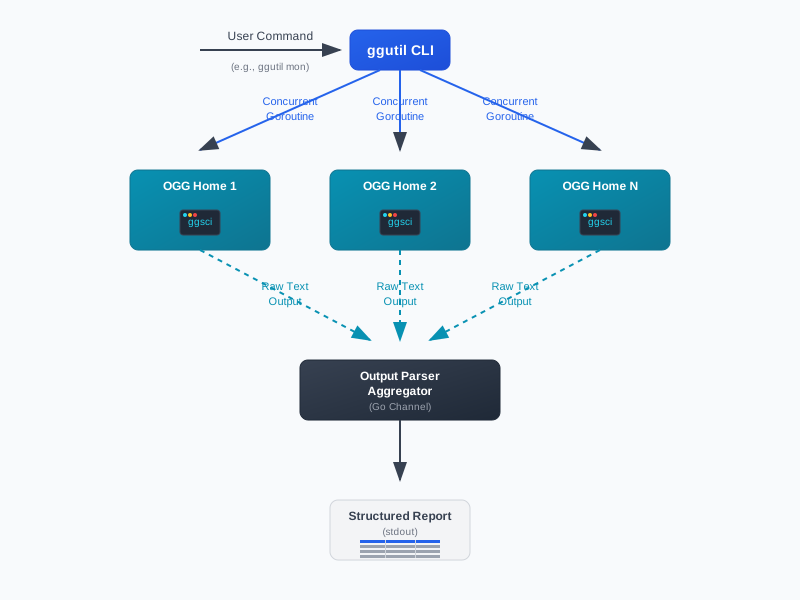 Figure: ggutil CLI concurrent workflow architecture. User commands are dispatched to multiple OGG Homes via concurrent Goroutines, raw outputs are parsed and aggregated, and finally structured reports are generated for the user.
The above diagram illustrates the concurrent workflow architecture of ggutil. When a user issues a command, ggutil launches multiple Goroutines to interact with different OGG Homes in parallel. Each Goroutine executes the required ggsci commands, collects raw text output, and sends it to a central parser and aggregator. The results are then formatted into structured reports, providing a clear and efficient overview for the user.
Our first technical decision was the programming language. Why Go? Three reasons:
- Native Concurrency: Go’s Goroutines and Channels make writing high-concurrency programs simple and efficient. For our need to operate on many OGG Homes simultaneously, it’s a perfect fit. Spawning hundreds or thousands of Goroutines is lightweight—far superior to traditional threading models.
- Cross-Platform Compilation: Go easily compiles into a single, dependency-free binary for Linux, Windows, macOS, etc. This means we can distribute
ggutilto users in any environment without requiring complex runtimes. - Robust Standard Library & Ecosystem: Go’s excellent standard library (
os/exec,regexp, etc.) and vibrant open-source community gave us a solid foundation for rapid development.
In ggutil, the core concurrency model works like this:
When a user runs a command (e.g., ggutil mon), the main program reads the OGG Home list from config, then launches a Goroutine for each OGG Home. We use sync.WaitGroup to ensure all Goroutines finish before the main program proceeds.
// Pseudocode: concurrent execution model
var wg sync.WaitGroup
// resultsChan safely collects concurrent task output
resultsChan := make(chan string, len(oggHomes))

for _, home := range oggHomes {
    wg.Add(1)
    go func(oggHome string) {
        defer wg.Done()
        // Run ggsci command in this Goroutine
        cmd := exec.Command(filepath.Join(oggHome, "ggsci"), ...)
        output, err := cmd.CombinedOutput()
        if err != nil {
            // Error handling
            return
        }
        // Send result to channel
        resultsChan <- string(output)
    }(home)
}

// Wait for all Goroutines to finish
wg.Wait()
close(resultsChan)

// Read and process all results from channel
for result := range resultsChan {
    // Parse and format output
}
This divide-and-conquer approach turns serial tasks into parallel ones, so total execution time is determined by the slowest task—not the sum of all tasks.
Beautiful Output: From Raw Text to Structured Reports
Another pain point of ggsci is its human-oriented, unstructured text output, which is hard for programs to parse. We invested significant effort to solve this.
Our solution: regular expressions. For each ggsci command, we crafted precise regex patterns to extract needed fields—process name, status, lag, table name, operation counts, etc. This tedious work is key to structured output.
Once extracted, we use the excellent open-source library github.com/bndr/gotabulate to render Go struct slices into beautifully aligned, uniform tables. This not only makes terminal output look professional, but also means results can be copy-pasted directly into emails or reports—no reformatting needed.
Robustness & User Experience
A great tool isn’t just powerful—it must be a pleasure to use.
- Modern CLI: We chose
github.com/urfave/cli/v2to buildggutil’s command-line interface. It gave us rich subcommands, flags (like--debug), and clear, auto-generated help docs (-h). - Flexible Environment Config: Every enterprise has its own ops habits.
ggutilsupports specifying OGG Home paths via-g/--gghomesCLI args or theGG_HOMESenvironment variable, making it easy to integrate into existing automation scripts. - Comprehensive Error Handling: We handle every potentially error-prone operation (file I/O, command execution, path checks) with detailed error messages. When errors occur,
ggutilgives clear prompts. If--debugis enabled, it prints detailed Goroutine error logs and stack traces for fast troubleshooting.
3. Open Source, Community, and the Road Ahead
We believe great tools should be shared. ggutil is fully open source under the MIT license on GitHub.
- GitHub Repo: https://github.com/goodwaysIT/ggutil
Open source is more than code—it’s about sharing ideas. I sincerely invite every OGG user and Go developer to try ggutil. Every issue, pull request, or suggestion is valuable fuel for this project’s progress.
Looking ahead, we have many ideas:
- Web UI: Develop a web interface for more intuitive monitoring and management.
- Monitoring Integration: Export
ggutilstats as Prometheus metrics for Grafana visualization. - Broader Platform Support: Keep up with new OGG versions and support more database types (MySQL, PostgreSQL, BigData, etc.).
ggutil is a successful exploration of solving real engineering problems. It combines Go’s modern engineering power with traditional database ops, proving that with technical innovation, we can break free from old tools and create more efficient, elegant solutions. I hope its open source release brings real value to your work.